


Azar: Video Chat, Meet Friends
3.819.19K Reviews
App Specs
- Version
- Varies with Device
- Updated On
- License
- Free
- Downloads
- 100,000,000+
- Developer
- Hyperconnect LLC
- Categories
- Communication
- Platform
- Android, iOS
Screenshots


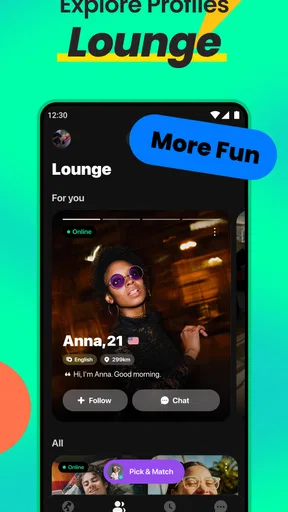

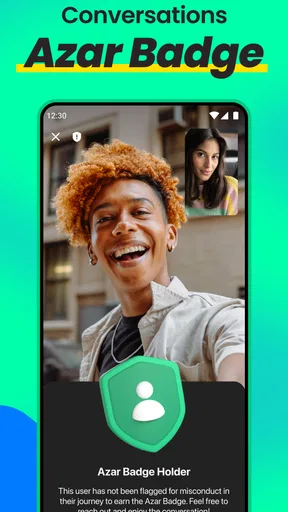
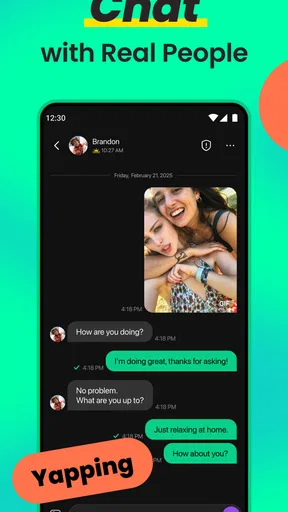

 Analysis by AppCompare
I approached Azar as a communication app rather than as a conventional social network. Its central idea is simple: use video chat to meet and talk with people beyond your existing contacts. That makes the quality of the experience depend on more than the interface. Your connection, surroundings, willingness to appear on camera, and ability to handle unexpected conversations all matter.
After spending time with it, my view is that Azar is most interesting when you want spontaneous interaction instead of carefully managed messaging. It can turn a few spare minutes into a conversation with someone new, but it can also feel tiring or unpredictable. I would recommend it to adults who understand that kind of uncertainty and want a more immediate way to connect. I would not suggest it to anyone looking for a quiet, private, text-first messenger.
How Azar feels when the network is doing the work
The app was released on October 28, 2013, and is developed by Hyperconnect LLC. It remains a recognizable name in mobile communication, with more than 100 million installs and an average rating of 3.8 from around 2 million ratings. Those figures suggest a large audience, but they do not guarantee that every conversation will feel worthwhile. The real appeal is the chance of finding a good interaction quickly, not the certainty of one.
Video chat changes the emotional rhythm compared with ordinary messaging. In a text app, I can pause, edit a sentence, or decide not to answer immediately. In Azar, the other person is present in the moment, so facial expressions, pauses, background noise, and camera confidence become part of the conversation. That immediacy can make a short exchange feel more human, but it also makes an awkward match harder to ignore.
A strong connection is especially important during the first moments of a conversation. If video freezes or audio arrives late, both people may assume the other is uninterested. I found that it helps to wait briefly before tapping through a match, because a momentary delay is not always a bad conversation. On the other hand, persistent lag is a genuine reason to move on; forcing a broken call usually wastes time and creates frustration on both sides.
The most useful mindset is to treat each connection as a brief possibility, not a promised friendship. That expectation keeps the app enjoyable. Some people will be talkative, some will leave quickly, and some conversations will simply have no common ground. Azar works better when I judge it by the quality of the occasional memorable exchange rather than by how many matches I can pass through.
Why video makes the app different from messaging
Compared with a standard messenger, Azar removes much of the preparation. I do not need an existing phone contact or a long profile conversation before speaking. That is its strongest distinction. It is also the reason the app can feel more exposed than familiar communication tools: I am not only sharing words, but also my face, voice, setting, and immediate reaction.
Worth Reading Before You Choose

Flipboard Shows What News Apps Must Do Beyond the Feed

Switching to Android Auto Means Rethinking Your Driving Routine

Google Calendar Makes a Crowded Week Easier to Manage

Ludo King Makes the Most of the Minutes Between Plans

Baby Panda World Brings Quick Play to Modern Phones, but Its Game Library Feels Busy

ESPN’s Live Game View Makes Following Close Games Easier
Compared with a traditional social network, the experience is less about building a public feed and more about direct encounters. There is less opportunity to understand someone through a long history of posts before talking. That makes the service faster, but it also limits context. If I want dependable contact with friends, a normal messenger is the better choice. If I want structured communities around a hobby, a group-based platform will usually be more suitable.
Using it in real mobile situations
Azar makes the most sense in situations where I have a little time and a reasonably stable connection. A quiet break at home, a pause between errands, or an evening when I feel curious about people in other places can all work. I would avoid starting a video conversation while walking near traffic, rushing through a station, or doing anything that requires my full attention. The app asks for more awareness than a background audio call.
One realistic scenario is a student or remote worker taking a short break after finishing a task. They can sit somewhere private, check the camera framing, and begin a few conversations without committing to a long social event. If the first exchange is uncomfortable, it is easy to end it and try again later. The important part is choosing a setting where a sudden conversation will not expose private surroundings or interrupt another responsibility.
Using a phone in public requires extra judgment. A camera can reveal more than intended: a workplace screen, family members in the background, a street sign, or documents on a table. I recommend pointing the camera toward a neutral wall or using a location where the background says very little about you. This is a small preparation step, but it makes spontaneous video chat feel much less careless.
Battery and connection quality also shape the practical experience. Video is more demanding than sending a message, so I would not begin a long session when the phone is already close to shutting down. A weak mobile signal can make a conversation appear rude or broken even when both users are trying. If the call repeatedly stutters, switching to a stronger connection or waiting until you are somewhere more stable is more sensible than repeatedly restarting the same interaction.
Small habits that improve first conversations
I found three habits particularly useful. First, I check what the camera is showing before entering a conversation. Second, I keep the opening simple instead of trying to perform or impress. Third, I leave quickly when the interaction feels uncomfortable rather than treating persistence as politeness. These steps do not change the matching system, but they make the human side of the app easier to manage.
A fourth habit is to decide in advance how much time I actually want to spend. Without a limit, rapid conversations can become strangely absorbing, especially when I keep hoping the next match will be better. A short personal boundary helps me use Azar as a social break instead of allowing it to take over an evening.
Another useful trade-off concerns camera use. Showing your face is central to video chat, but choosing a well-lit, neutral position can make the conversation more comfortable without turning the experience into a staged presentation. I would avoid revealing a detailed home interior or using the app in a place where other people might appear without agreeing to be on camera.
What happens when a conversation fails
Failure in Azar is not limited to technical failure. A call can end because the network is unstable, because one person is not interested, or because the conversation crosses a personal boundary. Those situations feel different, but the best response is similar: do not spend too long trying to rescue an interaction that is not working.
When the image freezes, I first give it a short moment and check whether audio is still moving normally. If the problem continues, leaving and trying again later is more efficient. Repeatedly tapping through connection attempts can consume time and data while producing no better result. The app is built around quick encounters, so recovery should also be quick.
When the other person leaves immediately, I try not to interpret it as a judgment. The format encourages fast decisions, and people may be dealing with their own connection problems or interruptions. This is one of the emotional costs of spontaneous video chat: the app offers immediacy, but not much explanation when an exchange ends.
Personal discomfort deserves a firmer response. I would end the conversation if someone pressures me to share private information, makes the interaction threatening, or ignores a clear request to stop. I would also avoid moving a conversation to another service simply because the other person asks quickly. Keeping the first interaction within the app gives me more control over what I reveal and when I reveal it.
The Mature 17+ rating is important here. Azar is not an app I would hand to a child or recommend as a casual experiment for younger teenagers. Adults should still use judgment, because an age label does not remove the unpredictability of meeting strangers by video. Anyone uncomfortable with direct contact should choose a service where communication can begin with text and stronger personal boundaries.
Handling in-app spending without losing control
Azar is free to install and use, but it includes in-app purchases ranging from $0.49 to $399.99 per item. That broad range makes it especially important to understand what I am willing to spend before browsing optional extras. I would not treat paid tools as a requirement for having a worthwhile conversation. The basic value of the app comes from the interaction itself, and spending can easily become a response to disappointment rather than a deliberate choice.
My practical advice is to avoid making a purchase immediately after an awkward or unproductive session. Frustration can create the feeling that an upgrade will fix the social outcome, but no payment can guarantee chemistry, respect, or a stable connection. If someone wants to explore paid options, setting a firm personal budget first is far safer than deciding in the middle of a fast-moving session.
Using Azar carefully on mobile data
Video communication can consume mobile data more quickly than text chat, so I would use Azar with awareness of my connection. I do not need an exact measurement to notice the difference: a long sequence of video conversations is a much heavier activity than sending a few messages. When I am away from a reliable connection, I keep sessions shorter and avoid leaving the app active while doing something else.
This matters for travelers and anyone with a limited mobile plan. A spontaneous conversation can stretch beyond the original intention, especially when several matches are interesting. I recommend checking the phone’s own data controls and reviewing usage after a few sessions. Those tools are more dependable for personal monitoring than guessing from how long a call felt.
Data awareness also improves battery planning. If I know I will be away from a charger, I use the app in shorter blocks and close it when I am finished. The goal is not to make the experience overly technical; it is simply to prevent a casual conversation from leaving me without enough battery for navigation, calls, or emergencies later in the day.
Privacy is another form of data-conscious use. I think carefully before saying my full name, workplace, school, neighborhood, travel plans, or other details that could identify me. A friendly conversation does not require a complete personal profile. Keeping the first exchange general lets me decide whether trust has actually developed before sharing anything more specific.
Who gets the most from this format
Azar is a good fit for adults who enjoy spontaneous social contact, are comfortable appearing on camera, and can accept that many conversations will be brief. It may appeal to someone practicing casual conversation, feeling curious about people outside their usual circle, or wanting a more immediate alternative to endless profile browsing. The strongest users are not necessarily the most outgoing; they are the ones who can leave an interaction without taking every outcome personally.
I would skip it if I need dependable communication with known people, detailed moderation expectations, or a calm environment where I can control every step before being seen. People with limited data, unreliable connectivity, strong camera privacy concerns, or little patience for abrupt endings may be happier with a regular messenger. Someone looking for romance should also be cautious about treating every match as a serious prospect; the format provides contact, not proof of compatibility or trust.
The developer’s long presence in this category and the app’s large install base make Azar easy to recognize, but popularity is not the same as suitability. The rating of 3.8 shows a mixed overall reaction rather than universal satisfaction. I read that as a useful warning: the concept works for some people, while the unpredictability, technical friction, and social exposure will be deal-breakers for others.
My connectivity verdict
Azar succeeds when the network, setting, and mood line up. A stable connection lets the app’s main idea come through: meeting someone new without building a long message thread first. A poor connection turns that same idea into frozen video, repeated exits, and unnecessary data use. Because the service is so dependent on live interaction, the surrounding circumstances are part of the product experience, not minor details.
I like it as an occasional social tool rather than a daily communication replacement. I would open it when I genuinely wanted a spontaneous conversation, prepare a private and well-lit place, keep personal information limited, and stop when the experience stopped being enjoyable. That approach preserves the app’s sense of discovery without pretending that every match will be meaningful.
My final recommendation is cautious but positive for the right adult user. Azar is free, direct, and more immediate than ordinary messaging, yet it asks for patience with strangers, awareness of mobile conditions, and firm personal boundaries. If you want controlled conversations with people you already know, choose a conventional messenger. If you are comfortable with unpredictable video encounters and understand the costs of live connectivity, this app can provide genuinely memorable moments alongside a fair amount of ordinary or forgettable ones.
Pros
- Quickly connects you with people from different countries.
- Video and text chat options make conversations more flexible.
- Profile filters help narrow matches by gender and location.
- Built-in translation features can reduce language barriers.
- Easy-to-use interface with a straightforward matching process.
Cons
- Many useful filters and features require in-app purchases.
- Random video matching may expose you to inappropriate behavior.
- The app can consume significant mobile data during video calls.
- Some matches may be inactive
- fake
- or looking for promotions.
- Frequent notifications can feel intrusive without careful settings.
FAQs for Azar: Video Chat, Meet Friends
What is Azar: Video Chat, Meet Friends, and how does it work?
Azar is a social video-chat app that lets you meet people through live video conversations. After creating a profile, you can discover users based on selected preferences, start video chats, and use text messages or translation features when available. The experience is designed for spontaneous conversations, so matches may be with people from different countries and backgrounds.
Is Azar: Video Chat, Meet Friends free to download and use?
Azar can generally be downloaded for free on Android and iOS, and some of its basic discovery and communication features may be available without payment. However, the app also includes optional in-app purchases, subscriptions, or premium features that can improve matching options and access to certain tools. Check the current store listing for pricing in your region.
Is Azar safe for teenagers and younger users?
Azar is intended for adults and may not be suitable for children or younger teenagers because conversations take place with strangers and user-generated content can be unpredictable. Parents should review the app’s current age rating, privacy settings, and safety policies before allowing access. Users should never share personal information, send money, or agree to meet strangers privately.
What privacy and safety features does Azar provide?
Azar typically offers tools such as blocking, reporting, moderation systems, and profile controls to help users manage unwanted interactions. Even with these protections, no live-chat platform can eliminate every risk. Keep conversations inside the app, avoid revealing your address or financial details, and report suspicious behavior immediately. Review permissions carefully before enabling camera, microphone, or location access.
Does Azar require a strong internet connection, and what permissions does it use?
Because Azar focuses on live video communication, a stable Wi-Fi or mobile-data connection is important for smooth calls and fewer interruptions. The app may request access to your camera and microphone, and some features may use additional account or device information. Before downloading, make sure your phone meets the current requirements and review permissions and data practices in the official app-store listing.


